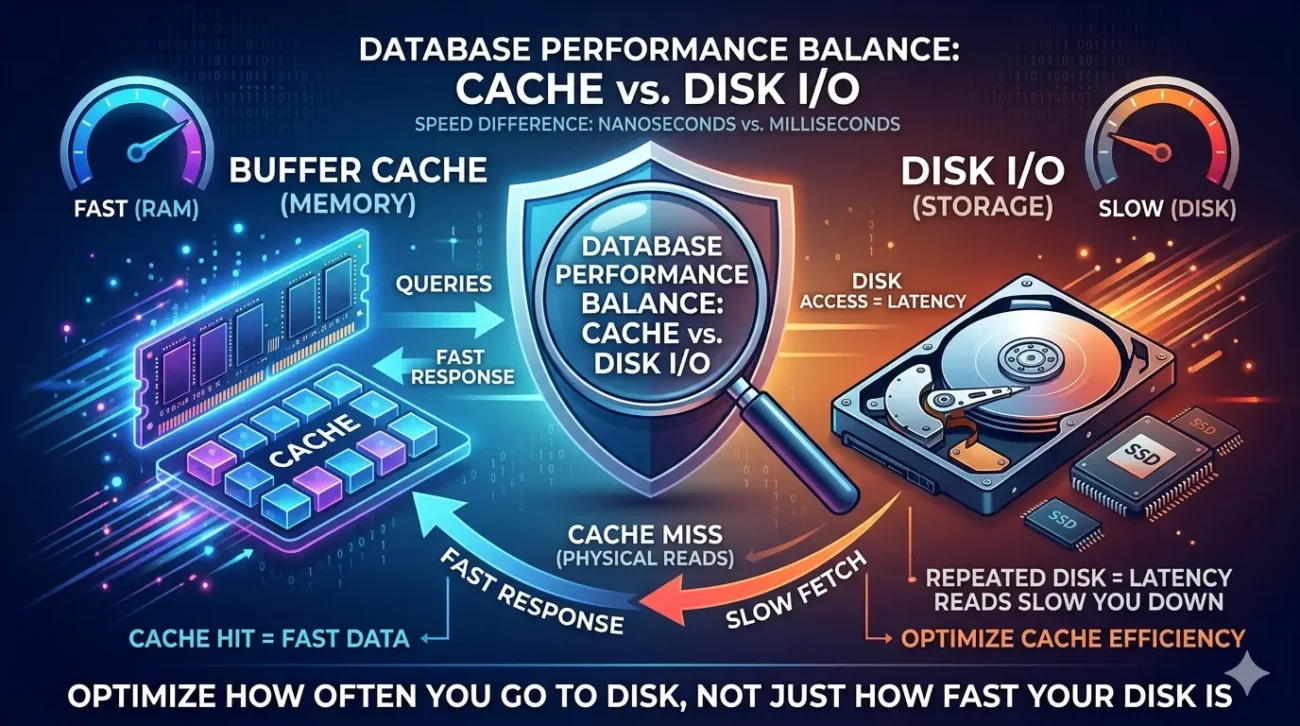
In database performance tuning, few debates are as persistent or as misunderstood as the relationship between buffer cache and disk I/O. When systems slow down, the immediate assumption is often that “the disk is too slow” or that “we need faster storage.” While disk performance certainly plays a role, the reality is more nuanced.
In many cases, the real issue is not the speed of the disk, but how effectively the database uses memory, specifically, the buffer cache. Understanding where time is actually being spent serving data from memory or retrieving it from disk is fundamental to diagnosing and resolving performance problems.
This distinction is critical because the solutions differ entirely. Investing in faster storage may yield marginal gains, whereas improving cache efficiency can transform performance dramatically.
What Is the Buffer Cache?
The buffer cache (also referred to as the buffer pool in some systems) is an area of memory where the database stores frequently accessed data pages.
Rather than reading from disk every time a query is executed, the database first checks whether the required data is already in memory. If it is, the data can be returned almost instantly. If not, the system must fetch it from disk, which is significantly slower.
In essence, the buffer cache acts as a high-speed layer between your queries and your storage system.
Memory access is measured in nanoseconds; disk access, even on fast SSDs, is measured in microseconds or milliseconds. That gap is where performance is won or lost.
Understanding Disk I/O
Disk I/O refers to the process of reading data from or writing data to storage. Even with modern solid-state drives, disk operations are orders of magnitude slower than memory access.
There are two primary types of I/O to consider:
Read I/O
Occurs when the database retrieves data not currently in cache. These are often the most visible performance bottlenecks, especially in read-heavy workloads.
Write I/O
Involves persisting changes to disk. While many databases optimise writes through buffering and batching, sustained write pressure can still introduce latency.
When queries rely heavily on disk I/O, response times increase, throughput decreases, and system resources become strained.
Cache Hits vs Cache Misses
The effectiveness of the buffer cache is typically measured through cache hit ratio.
- Cache Hit: Data is found in memory and returned quickly
- Cache Miss: Data must be fetched from disk, incurring latency
A high cache hit ratio generally indicates efficient use of memory. However, the interpretation is not always straightforward. A system can show a high hit ratio overall while still suffering from critical queries that consistently miss the cache.
Where Performance Is Actually Lost
The key to understanding database performance lies in identifying where delays originate.
Repeated Disk Reads
When frequently accessed data does not remain in cache, the database repeatedly fetches it from disk. This is often due to insufficient memory or inefficient query patterns.
Full Table Scans
Queries that scan entire tables rather than using indexes generate significant I/O. These operations can quickly overwhelm storage systems, especially on large datasets.
Cache Eviction Pressure
If the buffer cache is too small relative to the working dataset, useful data is constantly evicted and reloaded. This creates a cycle of unnecessary disk reads.
Poor Locality of Access
Queries that access data randomly rather than sequentially reduce cache efficiency. The database cannot effectively reuse cached pages.
Write-Heavy Workloads
High volumes of writes can saturate I/O capacity, particularly when combined with logging and checkpoint operations.
Common Misconceptions
“Faster Disks Will Solve Everything”
Upgrading storage may improve performance, but it does not address inefficient query patterns or poor cache utilisation. Without addressing the root cause, gains are often limited.
“High Cache Hit Ratio Means No Problem”
A high overall ratio can mask inefficiencies. A few critical queries missing the cache can still degrade user experience significantly.
“More Memory Always Fixes It”
While increasing memory helps, it is not a substitute for proper indexing, query design, and workload optimisation.
How to Diagnose the Bottleneck
Effective tuning begins with identifying whether the issue lies in memory or disk usage.
Monitor I/O Wait Times
High wait times indicate that queries are spending significant time waiting for disk operations.
Analyse Query Patterns
Identify queries that perform large scans or access data inefficiently.
Track Buffer Cache Usage
Observe how often data is reused versus reloaded. Frequent churn in the cache is a warning sign.
Compare Logical vs Physical Reads
Logical reads (from memory) are fast; physical reads (from disk) are costly. A high proportion of physical reads suggests a caching problem.
Optimisation Strategies
Improve Indexing
Well-designed indexes reduce the need for full table scans and minimise disk I/O.
Increase Effective Memory Usage
Allocating sufficient memory to the buffer cache allows more data to remain in memory.
Optimise Queries
Rewrite inefficient queries to reduce unnecessary data access and improve locality.
Reduce Working Set Size
Archiving old or infrequently accessed data can help keep active data within the cache.
Tune I/O Subsystems
Where disk I/O is unavoidable, ensure storage is properly configured and capable of handling the workload.
Striking the Right Balance
The goal is not to eliminate disk I/O entirely, that is neither realistic nor necessary. Instead, the objective is to ensure that:
- Frequently accessed data resides in memory
- Disk access is minimised and efficient
- The system maintains a healthy balance between memory usage and storage performance
A well-optimised database uses disk as a persistence layer, not as the primary source for every query.
Closing Thoughts
Buffer cache and disk I/O are not competing concepts; they are complementary components of database architecture. However, performance issues often arise when the balance between them is mismanaged.
Focusing solely on storage speed overlooks one of the most powerful levers available: efficient use of memory. In many cases, the difference between a sluggish system and a highly responsive one lies not in faster disks, but in smarter data access patterns.
If there is one principle to carry forward, it is this:
optimise how often you go to disk, not just how fast your disk is.